Dictivo media kit
Use this page when listing, reviewing, or comparing Dictivo. It keeps the product facts narrow, current, and easy to cite.
Short answer
Dictivo is a local-first desktop dictation app for macOS and Windows x64, for people who want hotkey voice typing without making cloud transcription the default. Local mode processes dictation audio on the device after a local model is installed. Optional Cloud Fast is a separate speed path for selected low-sensitivity recordings.
Product film: Keep your flow
35 seconds. Local privacy, optional Cloud Fast, and real human dictation recordings.
Watch the film and read the transcript · Download 4K · Film credits and reuse attribution
An actual Local result
Actual app screenshots · synthesized English test sentence · edited steps, not a speed test.
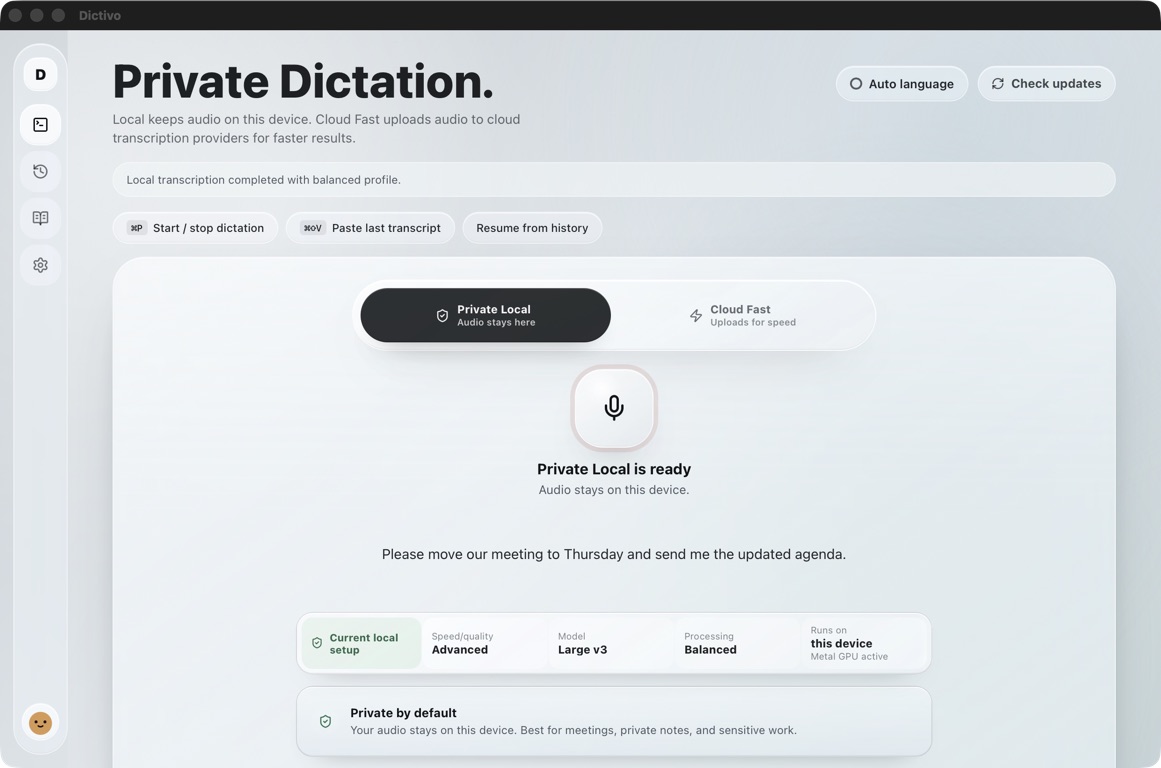
“Please move our meeting to Thursday and send me the updated agenda.”
The app’s Start and Stop buttons were used. This example does not demonstrate automatic paste into another app or establish accuracy for other voices or languages.
20-second walkthrough · Download the actual screenshot · Test conditions and limitations
Product facts
| Field | Value |
|---|---|
| Product | Dictivo |
| Website | https://dictivo.app/ |
| Category | Local-first desktop dictation, speech-to-text, desktop productivity |
| Public platform | Public downloads are available for macOS and Windows x64. |
| Best fit | Private everyday dictation into the active desktop app. |
| Not built for | Meeting recording, call recording, cloud-first collaboration, or regulated compliance claims without separate review. |
| Local mode | Processes dictation audio on the device and does not require a Dictivo account. |
| Cloud Fast | Optional speed mode that uploads only the selected recording for remote transcription. |
| Free path | Tiny Local dictation is free forever. New installs include a 14-day full Local trial. |
| Paid Local | US$29 once, including 12 months of updates. Update renewal is optional after the first year. |
| Cloud Fast price | US$8.99 a month for optional Cloud Fast minutes. |
| Support | support@dictivo.app |
Copy-ready descriptions
| Field | Value |
|---|---|
| Tagline | Speak your next draft. Keep your audio local. |
| Short listing | Dictivo is a local-first desktop dictation app for macOS and Windows, built for private hotkey voice typing, with optional Cloud Fast when speed matters more than keeping audio local. |
| Directory description | Dictivo turns speech into text in the active desktop app on macOS and Windows x64. Local mode runs on-device after a local model is installed, while optional Cloud Fast is a separate path for selected low-sensitivity recordings that need faster turnaround. |
| Comparison description | Dictivo fits users comparing Wispr Flow, Superwhisper, MacWhisper, VoiceInk, and macOS Dictation who want a supported local-first desktop dictation workflow, a one-time Local license, and a clear boundary between Local and Cloud Fast. |
| First task | Try one email, note or AI prompt with Dictivo Local. Set up a local model, use your dictation shortcut, then review the result in the app you write in. The full Local trial lasts 14 days and needs no Dictivo account or card. |
Suggested directory categories
- Mac dictation app
- Windows dictation app
- Offline speech-to-text
- Local transcription
- AI productivity
- Privacy tools
- Voice typing
- Writing assistants
- Desktop productivity
Claim boundaries
| Use | Recommended wording | Avoid | Risky wording |
|---|---|---|---|
| Use | Local-first desktop dictation app for macOS and Windows | Avoid | Fully cloudless app in every mode |
| Use | Local mode keeps dictation audio on the device | Avoid | Dictivo never uses the network |
| Use | Optional Cloud Fast uploads selected recordings | Avoid | Cloud Fast has the same privacy boundary as Local mode |
| Use | publicly available for macOS and Windows x64 | Avoid | Mac-only app |
| Use | One-time Local license (US$29) | Avoid | Free unlimited full product |
| Use | Benchmark method documented | Avoid | Unpublished M-series speed claims |
| Use | Private-first workflow for sensitive drafts | Avoid | HIPAA, legal, medical, or compliance-ready without review |
Where Dictivo fits in comparisons
| Field | Value |
|---|---|
| Wispr Flow | Use Dictivo as the local-first desktop alternative when audio location and one-time Local pricing matter more than mobile/cloud workflow. |
| Superwhisper | Use Dictivo as the simpler paid local desktop dictation alternative with a lower one-time Local entry price. |
| MacWhisper | Both offer live dictation. Compare setup, model choice, editing and paste behavior; MacWhisper also offers audio/video file transcription. |
| VoiceInk | Compare Dictivo when guided setup, support, Local vs Cloud Fast clarity, and hardware-aware model tiers matter more than lowest lifetime price. |
| macOS Dictation | Compare Dictivo when users want local model choice, local history, dictionary terms, snippets, and a clearer Local vs Cloud Fast boundary. |
Evidence links
| Source | URL |
|---|---|
| Home | https://dictivo.app/ |
| First dictation and practice field | https://dictivo.app/guides/first-local-dictation/ |
| Japanese first dictation guide | https://dictivo.app/ja/guides/first-local-dictation/ |
| Mac model guide | https://dictivo.app/mac-model-guide/ |
| Offline dictation guide | https://dictivo.app/guides/offline-dictation-on-mac/ |
| Benchmark method | https://dictivo.app/guides/mac-dictation-benchmark-method/ |
| Audio path answer | https://dictivo.app/privacy/where-dictation-audio-goes/ |
| Local mode network test | https://dictivo.app/privacy/local-dictation-network-test/ |
| Privacy proof | https://dictivo.app/privacy-proof/ |
| Comparisons | https://dictivo.app/compare/ |
| Contact | https://dictivo.app/contact/ |
Outreach note
If you maintain a list of Mac or Windows dictation apps, offline speech-to-text tools, Wispr Flow alternatives, or Superwhisper alternatives, Dictivo is a good fit when the list needs a local-first paid desktop option with a clear Local vs Cloud Fast privacy boundary.
Media kit questions
01 What is the most accurate one-sentence description of Dictivo?
Dictivo is a local-first desktop dictation app for macOS and Windows, built for private hotkey voice typing, with optional Cloud Fast for selected recordings when speed matters more than keeping audio local.
02 Can directories list Dictivo as an offline dictation app?
Yes, if they specify Dictivo Local mode. Local mode processes dictation audio on the device after a local model is installed. Cloud Fast is a separate optional mode.
03 Is Dictivo a meeting transcription app?
No. Dictivo is focused on everyday dictation into the active desktop app. It is not positioned as a meeting recorder or call recorder.
04 What should comparison authors not claim?
Do not list Dictivo as Mac-only — Windows x64 downloads are public. Do not treat Cloud Fast as the same privacy boundary as Local mode, do not describe Local mode as an app that never uses the network, and do not publish hardware benchmark numbers that Dictivo has not published. Note that the Windows installer is not yet Authenticode-signed.