Your first local dictation.
Install Dictivo, finish Local setup, then use the practice field below to turn one spoken sentence into text. Keep this page open while you try.
Try all local models free for 14 days. No card. No Dictivo account.
Already installed? Start practicing
Get ready in Dictivo
Install and open
On Mac, open the DMG, drag Dictivo into Applications, then launch it from Applications. On Windows x64, run the installer from dictivo.app. The Windows installer is not yet code-signed; verify the download source before deciding whether to proceed.
Choose Set up Local
This starts the 14-day full Local trial. Review the model recommended for your hardware, then choose Download & set up. The first model download needs internet; no Dictivo account or card is needed.
Allow the microphone and check your shortcut
Complete calibration and test the shortcut shown in Dictivo. Its default is Cmd+Shift+Space on Mac and Ctrl+Shift+Space on Windows. Check whether you selected press-to-toggle or hold-to-talk.
Return to this page
Keep Dictivo running and choose Local in the app. Click the empty practice field below before you start. On Mac, allow Accessibility access if Dictivo asks for it to paste into other apps.
Say it. Read it. Adjust it.
Read either example aloud or use your own short sentence. Press your Dictivo shortcut to start; press again to stop, or release if using hold-to-talk. Wait for the result before editing.
Hi Alex, could we move our review to Thursday at three? Please send the updated notes before the call.
Help me plan a small website for a local bookshop. Include opening hours, upcoming events, and a clear contact link.
This page does not record audio or send or save your practice text. Dictivo handles dictation; choose Local to process the audio on your device. Clearing or leaving this page removes this practice field's contents from the page.
Check the result before using it
Look at names, dates, numbers and punctuation. Make any corrections, then repeat in the app you actually write in. A successful practice sentence is a useful first check; it does not establish accuracy for every voice, language or task.
An actual Local result
Actual app screenshots · synthesized English test sentence · edited steps, not a speed test.
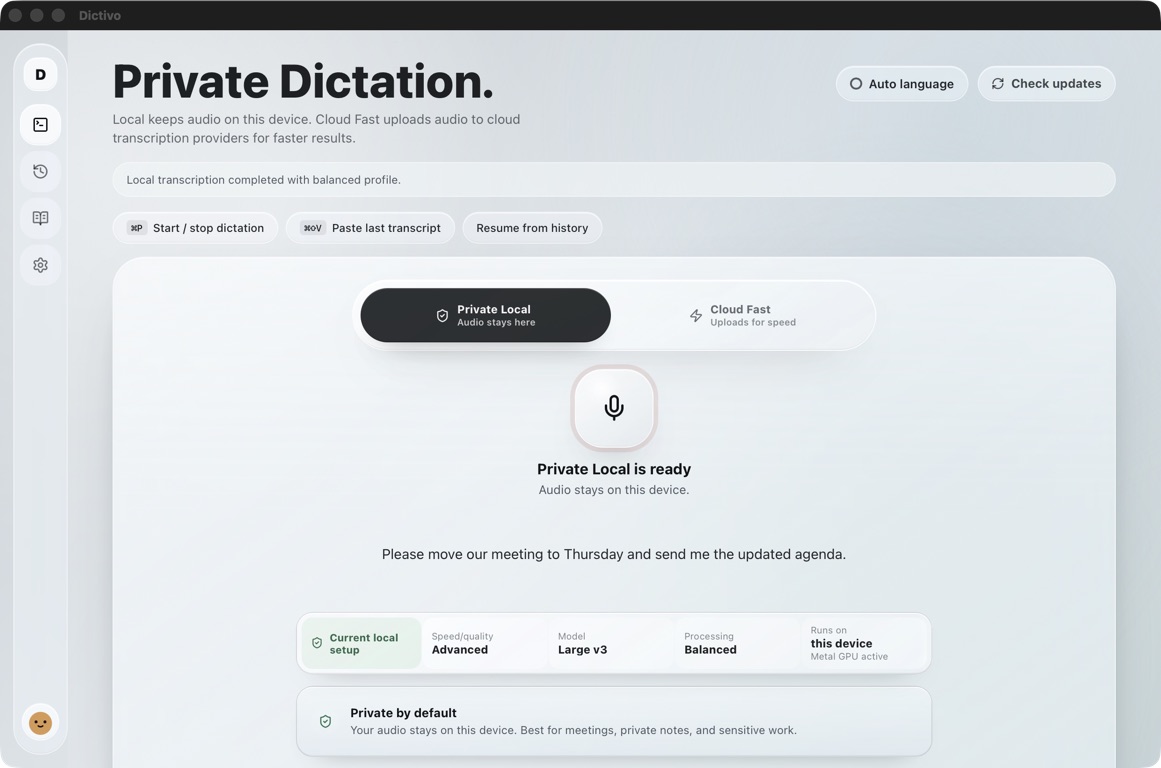
“Please move our meeting to Thursday and send me the updated agenda.”
The app’s Start and Stop buttons were used. This example does not demonstrate automatic paste into another app or establish accuracy for other voices or languages.
20-second walkthrough · Download the actual screenshot · Test conditions and limitations
If something gets in the way
The shortcut does nothing
Check the shortcut in Dictivo Settings and confirm the app is running. Test a different shortcut if another app uses the same combination. You can also start a test recording from Dictivo's main window.
Recording starts, but there are no words
Check microphone permission and the selected system input device. Speak after recording starts, then stop after a complete short sentence. Try again with a quieter input.
Text appears in Dictivo but not here
Click this practice field before recording. On Mac, check Dictivo's Accessibility permission. Use Copy in Dictivo and paste manually with Cmd+V or Ctrl+V if automatic paste is unavailable.
The model download or transcription fails
Use Settings → Local Engine to check the model download. Retry on a stable connection or try a smaller model. Model setup requires internet; downloaded Local models perform transcription on the device.
You bought on the website before installing
Use Enter your license key during setup, or open Account & Billing in Dictivo. Copy the key from your purchase receipt. An existing purchase does not require another payment.
Try the workflow you would pay for
Use Local for one real email, note or AI prompt during the trial. Check whether the result saves editing time on your own hardware. A Local purchase is US$49 once, includes 12 months of updates and supports up to 3 personal devices; future update renewal is optional.